
Updating LinuxCNC to a new minor release (ie to a new version in the same stable series, for example from 2.9.7 to 2.9.8) is an automatic process if your PC is connected to the internet. You will see an update prompt after a minor release along with other software updates. If you don’t have an internet connection to your PC see Updating without Network.
1. Обновление до новой версии
В этом разделе описывается, как обновить LinuxCNC с версии 2.8.x до версии 2.9.y. Предполагается, что у вас есть установленная версия 2.8, которую вы хотите обновить.
Чтобы обновить LinuxCNC с версии старше 2.8, вам необходимо сначала обновление старой установки до 2.8, а затем следовать этим инструкциям. для обновления до новой версии.
Если у вас нет старой версии LinuxCNC для обновления, лучше всего выполнить новую установку новой версии, как описано в разделе Getting LinuxCNC.
Furthermore, if you are running Ubuntu Precise, Debian Wheezy or Debian Buster it is well worth considering making a backup of the "linuxcnc" directory on removable media and performing a clean install of a newer OS and LinuxCNC version as these releases were EOL in 2017, 2018 and 2022 respectively. If you are running on Ubuntu Lucid then you will have to do this, as Lucid is no longer supported by LinuxCNC (it was EOL in 2013).
Чтобы обновить основные версии, такие как 2.8, до 2.9, когда у вас есть сетевое соединение на компьютере, вам необходимо отключить старые источники apt linuxcnc.org в файле /etc/apt/sources.list и добавить новый источник apt linuxcnc.org для 2.9. , затем обновите LinuxCNC.
Детали будут зависеть от того, на какой платформе вы работаете. Откройте terminal, затем введите lsb_release -ic, чтобы найти эту информацию:
lsb_release -ic
Distributor ID: Debian
Codename:       Trixie
You should be running on Debian Bullseye, Bookworm or Trixie or Ubuntu 20.04 "Focal Fossa" or newer. LinuxCNC 2.9.y will not run on older distributions than these.
Вам также нужно будет проверить, какое используется ядро реального времени:
uname -r
6.1.0-10-rt-amd64
Если вы видите (как указано выше) -rt- в имени ядра, значит, вы используете ядро preempt-rt и вам следует установить версию LinuxCNC "uspace". Вам также следует установить uspace для конфигураций "sim" на ядрах, не работающих в реальном времени.
Если вы видите -rtai- в имени ядра, значит, вы используете RTAI в реальном времени. См. ниже версию LinuxCNC для установки. Пакеты RTAI доступны для Bookworm и Buster, но в настоящее время недоступны для Bullseye.
1.1. Конфигурация источников Apt
-
Откройте окно
Software Sources. Этот процесс немного отличается на трех поддерживаемых платформах:-
Debian:
-
Нажмите
Applications Menu, затемSystem, затемSynaptic Package Manager. -
В Synaptic нажмите меню
Settings, затем нажмитеRepositories, чтобы открыть окноSoftware Sources.
-
-
Ubuntu Precise:
-
Нажмите на значок
Dash Homeв левом верхнем углу. -
В поле
Searchвведите "software", затем щелкните значокUbuntu Software Center. -
В окне Ubuntu Software Center нажмите меню
Edit, затем нажмитеSoftware Sources..., чтобы открыть окноSoftware Sources.
-
-
Ubuntu Lucid:
-
Откройте меню
System, затемAdministration, затемSynaptic Package Manager. -
В Synaptic нажмите меню
Settings, затем нажмитеRepositories, чтобы открыть окноSoftware Sources.
-
-
-
В окне
Software Sourcesвыберите вкладкуOther Software. -
Удалите или снимите флажки со всех старых записей linuxcnc.org (оставьте все строки, отличные от linuxcnc.org, как есть).
-
Нажмите кнопку
Addи добавьте новую строку apt. На разных платформах строка будет немного отличаться:
| OS / Realtime Version | Repository |
|---|---|
Debian Bullseye - preempt |
|
Debian Bookworm - preempt |
|
Debian Bookworm - RTAI |
|
Debian Trixie - preempt |
|
Debian Trixie - RTAI |
|
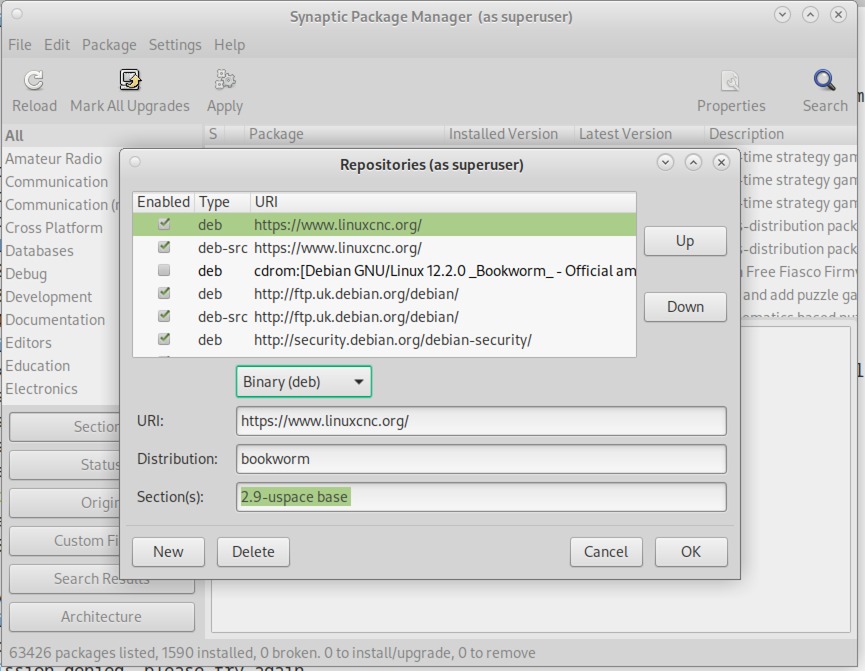
-
Нажмите
Add Source, затемCloseв окне Software Sources. Если появится окно с сообщением о том, что информация о доступном программном обеспечении устарела, нажмите кнопкуReload.
1.2. Обновление до новой версии
Теперь ваш компьютер знает, где взять новую версию программного обеспечения, теперь нам нужно ее установить.
Процесс снова различается в зависимости от вашей платформы.
1.2.1. Debian Bullseye, Bookworm and Trixie
Debian используют диспетчер пакетов Synaptic.
-
Откройте Synaptic, следуя инструкциям в разделе Настройка источников apt выше.
-
Нажмите кнопку
Reload. -
Используйте функцию поиска для поиска
linuxcnc. -
Пакет называется «linuxcnc» для ядер RTAI и «linuxcnc-uspace» для preempt-rt.
-
Установите флажок, чтобы отметить новые пакеты linuxcnc и linuxcnc-doc-* для обновления. Менеджер пакетов может выбрать несколько дополнительных пакетов для установки, чтобы удовлетворить зависимости, которые имеет новый пакет linuxcnc.
-
Нажмите кнопку
Apply, и ваш компьютер установит новый пакет. Старый пакет linuxcnc будет автоматически обновлен до нового.
1.3. Ubuntu
-
Нажмите на значок
Dash Homeв левом верхнем углу. -
В поле
Searchвведите «update», затем щелкните значокUpdate Manager. -
Нажмите кнопку
Check, чтобы просмотреть список доступных пакетов. -
Нажмите кнопку
Install Updates, чтобы установить новые версии всех пакетов.
2. Обновление без сети
Для обновления без подключения к сети вам необходимо загрузить .deb, а затем установить его с помощью dpkg. Файлы .debs можно найти по адресу https://linuxcnc.org/dists/.
Вам нужно перейти по ссылке выше, чтобы найти правильный deb для вашей установки. Откройте terminal и введите «lsb_release -ic», чтобы найти название выпуска вашей ОС.
> lsb_release -ic
Distributor ID: Debian
Codename:       trixie
Pick the OS from the list then pick the major version you want like 2.9-rt for RTAI or 2.9-uspace for preempt-rt.
Next pick the type of computer you have: binary-amd64 for 64-bit PC or binary-arm64 (64bit) for Raspberry Pi.
Next pick the version you want from the bottom of the list like linuxcnc-uspace_2.9.8_amd64.deb (choose the latest by date). Download the deb and copy it to your home directory. You can rename the file to something a bit shorter with the file manager like linuxcnc_2.9.8.deb then open a terminal and install it with the package manager with this command:
sudo dpkg -i linuxcnc_2.9.8.deb
3. Обновление файлов конфигурации для версии 2.9
3.1. Более строгое обращение с подключаемыми интерпретаторами
Если вы просто запускаете обычный G-код и не знаете, что такое подключаемый интерпретатор, то этот раздел вас не касается.
Редко используемая функция LinuxCNC — это поддержка подключаемых интерпретаторов, управляемая недокументированной настройкой INI [TASK]INTERPRETER.
Версии LinuxCNC до 2.9.0 использовались для обработки неправильной настройки [TASK]INTERPRETER путем автоматического возврата к использованию интерпретатора G-кода по умолчанию.
Начиная с версии 2.9.0, неправильное значение [TASK]INTERPRETER приведет к тому, что LinuxCNC откажется запускаться. Исправьте это условие, удалив настройку [TASK]INTERPRETER из вашего INI-файла, чтобы LinuxCNC использовал интерпретатор G-кода по умолчанию.
3.2. Canterp
Если вы просто запускаете обычный G-код и не используете подключаемый интерпретатор canterp, то этот раздел вас не касается.
В крайне маловероятном случае использования canterp знайте, что модуль перемещен из /usr/lib/libcanterp.so в /usr/lib/linuxcnc/canterp.so, и настройку [TASK]INTERPRETER соответственно, необходимо изменить с libcanterp.so на canterp.so.
3.3. Ограничения шпинделя в INI
Теперь можно добавлять настройки в раздел [SPINDLE] INI-файла
MAX_FORWARD_VELOCITY = 20000 The maximum spindle speed (in rpm)
MIN_FORWARD_VELOCITY = 3000 The minimum spindle speed (in rpm)
MAX_REVERSE_VELOCITY = 20000 Если этот параметр опущен, по умолчанию будет установлено значение MAX_FORWARD_VELOCITY.
MIN_REVERSE_VELOCITY = 3000` This setting is equivalent to MIN_FORWARD_VELOCITY but for reverse spindle rotation. It will default to the MIN_FORWARD_VELOCITY if omitted.
INCREMENT = 200 Sets the step size for spindle speed increment / decrement commands. This can have a different value for each spindle. This setting is effective with AXIS and Touchy but note that some control screens may handle things differently.
HOME_SEARCH_VELOCITY = 100 - Принято, но в настоящее время ничего не делает
HOME_SEQUENCE = 0 - Принято, но в настоящее время ничего не делает
4. Updating Configuration Files for 2.10.y
Touchy: the Touchy MACRO entries should now be placed in a [MACROS] section of the INI rather than in the [TOUCHY] section. This is part of a process of commonising the INI setting between GUIs.
The mesa_modbus framework (modcompile and the mesa_modbus.c.tmpl driver template) has been removed. Configurations using it must migrate to the hm2_modbus driver with mesambccc-compiled MBCCB files, see hm2_modbus(9) and mesambccc(1). The 2.9 release retains the framework, so its documentation remains available in the 2.9 docs.
5. Preview renderer now requires OpenGL 3.3 core
The G-code preview shared by AXIS, the GTK screens (Gremlin / gmoccapy / gscreen / GladeVCP hal_gremlin / QtPlasmaC), and QtVCP was rewritten to use a single modern OpenGL 3.3 core-profile renderer (shaders, VBOs, an offscreen framebuffer for click selection, a glyph-atlas for overlay text). The legacy fixed-function path (display lists, immediate mode, GL_SELECT picking, glBitmap text, line stipple, GL_LIGHTING) has been removed. There is no runtime switch and no in-process fallback.
Hardware requirement. OpenGL 3.3 core is needed. On the supported platform (Linux with Mesa) this is available on Intel Sandy Bridge (2011) and newer, AMD r600 and newer, and nouveau. Machines without a capable GPU can use Mesa’s software renderer (llvmpipe), which handles the line-dominated preview acceptably:
LIBGL_ALWAYS_SOFTWARE=1 linuxcnc myconfig.ini
If a core context cannot be created the GUI exits at start-up with a diagnostic naming the OpenGL 3.3 requirement and suggesting LIBGL_ALWAYS_SOFTWARE=1, rather than starting with a blank or corrupt preview.
|
Warning
|
BREAKING: out-of-tree screens that inject raw legacy OpenGL
Custom screens that subclass the in-tree preview classes and override a drawing internal to emit raw fixed-function OpenGL (immediate mode, display lists, |
The immediate-mode drawing helpers of the old renderer (linuxcnc.draw_lines, linuxcnc.line9, linuxcnc.draw_dwells, linuxcnc.positionlogger.call()) are retired. They keep their names, signatures and argument checking so that out-of-tree callers still import and run, but they draw nothing and raise a DeprecationWarning on first use. The in-tree GUIs bake geometry to VBOs and upload the backplot from positionlogger.points().
5.1. Notes for integrators and driver authors
-
AXIS / Togl. The vendored Togl widget (
src/emc/usr_intf/axis/extensions/togl.c) gained a boolean-coreprofileoption (default false). When true it creates the context withglXChooseFBConfig+glXGetVisualFromFBConfig
glXCreateContextAttribsARB(OpenGL 3.3 core), raising a descriptive Tcl error on failure. AXIS always enables it. The default (false) path is unchanged, sovismachand any out-of-tree Togl users keep their legacy contexts. -
Gremlin (GTK). GTK3 only hands out core contexts through
GtkGLArea, so the gremlin widget still builds its context by hand via GLX, now requesting 3.3 core withglXCreateContextAttribsARB. PyOpenGL cannot resolve that extension entry point (it comes back as a null function), so gremlin loadslibGLdirectly withctypesand creates and binds the context (choose-fbconfig / make-current / swap) through that one handle to avoid mixing context pointers. -
Line width in core profiles. A forward-compatible core context (Qt requests one) rejects
glLineWidth(> 1)withGL_INVALID_VALUEeven thoughGL_ALIASED_LINE_WIDTH_RANGEreports a larger maximum. The renderer probes the accepted width once and caches it, so thick lines (the selection highlight, dwell markers) degrade to 1 px on such drivers instead of raising; a non-forward-compatible core context (AXIS’s Togl, Gremlin’s GLX) keeps the wider lines. Thick lines via quad expansion are a possible future improvement. -
vismach is unaffected: it keeps its legacy Togl context and immediate-mode drawing; only its camera consumes the (now GL-free) explicit matrices from
glnav.
5.2. The program is built in C++ during the parse
gcode.parse no longer drives the preview through per-move Python callbacks. For a canon that subclasses gcode.RendererCanon - rs274.glcanon.GLCanon is one, so every in-tree preview is - the whole program is built in C++ (GCodeRenderer, src/emc/rs274ngc/gcode_renderer.{hh,cc}): the g92/rotation/g5x transform, arc segmentation, rigid taps, (AXIS,hide) suppression, the vertices per drawn plane, the extents, the path lengths and the dwell and tool-change records. The finished program is handed over once, at the end of the parse, as a gcode.PreviewGeometry through the canon’s adopt_geometry(). A parse reads two more things off such a canon: program_geometry (the GEOMETRY strings and the rotation offsets) and arcdivision, which defaults to 64 and is read once at parse start. Every parse starts from a zero transform with nothing drawn; where the machine stands arrives as the caller’s initcode (a G53 G0 per axis), which the leading-traverse drop repositions on rather than draws. A RendererCanon subclass without a callable adopt_geometry is a TypeError from gcode.parse, not a silent fall back to callbacks.
The per-event canon protocol is unchanged for every other canon: rs274.interpret.PrintCanon, the interpreter tests and out-of-tree users of gcode.parse still receive straight_feed, arc_feed, next_line and the rest exactly as before, and rs274.interpret.Translated / ArcsToSegmentsMixin remain for them. The gcode module itself was rewritten on pybind11; its functions keep their names and signatures. One behaviour change: gcode.linecode() snapshots the running parse, and raises ValueError when no parse is in progress.
|
Warning
|
BREAKING: out-of-tree canons that subclass
rs274.glcanon.GLCanonOn a rendered parse the interpreter forwards only
|
5.3. How the preview is put together
The drawing itself lives in lib/python/rs274/glcanon_scene.py, in four tiers. Nothing here changes what the preview looks like; it is where to start reading if you need to fix or extend one part of it.
-
Parts. One class per drawing concern - grid, program geometry, extents, bounding box, offsets, small origin, axes, machine-limits box, tool, live backplot, DRO overlay, the
user_plot()hook. A part draws that one thing and nothing else. Adding a preview element means adding a part and placing it in the scene’s order, not editing an existing part. -
The scene.
PreviewSceneholds the parts in draw order and runs them. Visibility is decided by the scene, not the part: it evaluates each part’svisible(ctx)and simply does not call a part whose gate is false, sodraw()may assume it is visible and must not open with anif not shown: return. Gates that couple parts belong to the scene too - the extents-versus-bounding-box either/or, and the translucent compositingprogram_alphawraps the program in. -
Primitives. Services several parts share - a line array, a wireframe box, Hershey vector text, the tool-cone mesh - reached as
ctx.prim. Letters are a primitive that axes, extents and offsets all use, not a sibling of "axes". -
Passes. The preview is three sets of depth/blend state, not an arbitrary order: world geometry, translucent geometry drawn over it at equal depth, and the screen-space overlay. Each part declares its
pass_; the scene sets the state when the pass changes. A part that needs something else for its own drawing (the tool’s constant-alpha blend) restores it afterwards.
Transforms go through a scoped model-view stack: with ctx.mv.push(): restores the previous transform on exit, including when an exception unwinds through it, so a part cannot leak a transform onto a later one. Offsets, small origin and axes share one such scope (RelativeCoordGroup), because the axes are drawn in the offset frame the offsets progressively build.
Parts read a FrameContext - an explicit, enumerated list of machine, view and renderer state, built once per frame by GlCanonDraw - rather than the widget itself. That is what lets them be tested without a window: build a context by hand, call part.draw(ctx), and assert on the vertices it emitted.
Click-to-select is not a part - it draws nothing to the screen. Picker renders the same program geometry into an offscreen framebuffer with line numbers encoded as colour and resolves the nearest hit; GlCanonDraw.select(x, y) delegates to it. It shares one ProgramGeometry with the drawing part, so the pickable geometry and the drawn geometry cannot drift apart.
Setting GLCANON_DEBUG=1, the preview’s one verbosity switch, raises the rs274 logger to DEBUG, checks glGetError after each pass, logs which parts the scene drew and which it skipped whenever that split changes, and reports depth/blend state a part left behind.
6. New HAL components
6.1. Не в реальном времени
mdro mqtt-publisher pi500_vfd pmx485-test qtplasmac-cfg2prefs qtplasmac-materials qtplasmac-plasmac2qt qtplasmac-setup sim-torch svd-ps_vfd
6.2. В реальном времени
anglejog div2 enum filter_kalman flipflop homecomp limit_axis mesa_uart millturn scaled_s32_sums tof ton
7. Новые драйверы
Была представлена структура для управления устройствами ModBus с использованием последовательных портов на многих картах Mesa. http://linuxcnc.org/docs/2.9/html/drivers/mesa_modbus.html
Теперь включен новый драйвер GPIO для любого GPIO, поддерживаемого библиотекой gpiod: http://linuxcnc.org/docs/2.9/html/drivers/hal_gpio.html