
1. Introduction
Most of LinuxCNC’s screens have the ability to send loaded files through a filter program or use the filter program to make G-code. Such a filter can do any desired task: Something as simple as making sure the file ends with M2, or something as complicated as generating G-code from an image.
2. Setting up the INI for Program Filters
The [FILTER] section of the INI file controls how filters work. First, for each type of file, write a PROGRAM_EXTENSION line. Then, specify the program to execute for each type of file. This program is given the name of the input file as its first argument, and must write rs274ngc code to standard output. This output is what will be displayed in the text area, previewed in the display area, and executed by LinuxCNC when Run. The following lines add support for the image-to-gcode converter included with LinuxCNC:
[FILTER]
PROGRAM_EXTENSION = .png,.gif Greyscale Depth Image
png = image-to-gcode
gif = image-to-gcode
Il est également possible de spécifier un interpréteur:
PROGRAM_EXTENSION = .py Python Script
py = python
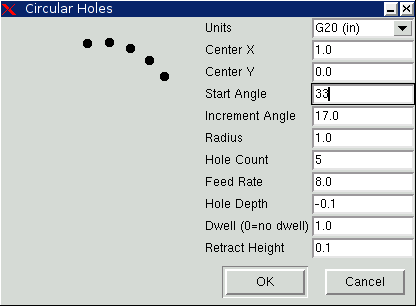
In this way, any Python script can be opened, and its output is treated as G-code. One such example script is available at nc_files/holecircle.py. This script creates G-code for drilling a series of holes along the circumference of a circle.
If the filter program sends lines to stderr of the form:
FILTER_PROGRESS=10It will set the screens progress bar to the given (10 in this case) percentage. This feature should be used by any filter that runs for a long time.
3. Making Python Based Filter Programs
Here is a very basic example of the filtering mechanics: When run through a Linucnc screen that offers program filtering, it will produce and write a line of G-code every 100th of a second to standard output. It also sends a progress message out to the UNIX standard error stream. If there was an error it would post an error message and exit with an exitcode of 1.
import time
import sys

for i in range(0,100):
    try:
        # simulate calculation time
        time.sleep(.1)

        # output a line of G-code
        print('G0 X1', file=sys.stdout)

        # update progress
        print('FILTER_PROGRESS={}'.format(i), file=sys.stderr)
    except:
        # This causes an error message
        print('Error; But this was only a test', file=sys.stderr)
        raise SystemExit(1)
Here is a similar program but it actually could filter. It puts up a PyQt5 dialog with a cancel button. Then it reads the program line by line and passes it to standard output. As it goes along, it updates any process listening to standard error output.
#!/usr/bin/env python3

import sys
import os
import time

from PyQt5.QtWidgets import (QApplication, QDialog, QDialogButtonBox,
                            QVBoxLayout,QDialogButtonBox)
from PyQt5.QtCore import QTimer, Qt

class CustomDialog(QDialog):

    def __init__(self, path):
        super(CustomDialog, self).__init__(None)
        self.setWindowFlags(self.windowFlags() | Qt.WindowStaysOnTopHint)
        self.setWindowTitle("Filter-with-GUI Test")

        QBtn = QDialogButtonBox.Cancel

        self.buttonBox = QDialogButtonBox(QBtn)
        self.buttonBox.rejected.connect(self.reject)

        self.layout = QVBoxLayout()
        self.layout.addWidget(self.buttonBox)
        self.setLayout(self.layout)

        self.line = 0
        self._percentDone = 0

        if not os.path.exists(path):
            print("Path: '{}' doesn't exist:".format(path), file=sys.stderr)
            raise SystemExit(1)

        self.infile = open(path, "r")
        self.temp = self.infile.readlines()

        # calculate percent update interval
        self.bump = 100/float(len(self.temp))

        self._timer = QTimer()
        self._timer.timeout.connect(self.process)
        self._timer.start(100)

    def reject(self):
        # This provides an error message
        print('You asked to cancel before finished.', file=sys.stderr)
        raise SystemExit(1)

    def process(self):
        try:
            # get next line of code
            codeLine = self.temp[self.line]

            # process the line somehow

            # push out processed code
            print(codeLine, file=sys.stdout)
            self.line +=1

            # update progress
            self._percentDone += self.bump
            print('FILTER_PROGRESS={}'.format(int(self._percentDone)), file=sys.stderr)

            # if done end with no error/error message
            if self._percentDone >= 99:
                print('FILTER_PROGRESS=-1', file=sys.stderr)
                self.infile.close()
                raise SystemExit(0)

        except Exception as e:
            # This provides an error message
            print(('Something bad happened:',e), file=sys.stderr)
            # this signals the error message should be shown
            raise SystemExit(1)

if __name__ == "__main__":
    if (len(sys.argv)>1):
        path = sys.argv[1]
    else:
        path = None
    app = QApplication(sys.argv)
    w = CustomDialog(path=path)
    w.show()
    sys.exit( app.exec_() )